
Relive Retro PC Games on Mobile
Overview
UTM SE: Retro PC emulator is a mobile-focused utility designed to bring classic PC gaming experiences to smartphones and tablets. Developed by Turing Software, LLC, this tool enables users to run vintage operating systems and software on Android and iOS devices. It serves as a bridge between nostalgic computing environments and modern mobile platforms, allowing enthusiasts to access old-school applications and games without physical hardware.
The software is particularly useful for retro gaming fans, digital preservationists, and mobile users who want to explore historical computing systems. It supports both VGA and terminal mode, offering flexibility in display output depending on the system being emulated. Built on the QEMU foundation, a well-established open-source emulator, UTM SE inherits a strong reputation for reliability and compatibility.
While it does not support JIT compilation, which may affect performance in some scenarios, it remains a capable solution for running x86, PPC, and RISC-V architectures. The emulator allows users to configure machines from scratch or use pre-defined setups, enhancing accessibility for both beginners and advanced users. The developer did not provide additional system requirements.
Key Features & Capabilities
- Multi-Architecture Emulation – Supports x86, PPC, and RISC-V architectures, enabling the execution of a wide variety of legacy software and operating systems on mobile devices.
- Dual Display Mode Support – Offers VGA mode for graphical output and terminal mode for text-based environments, accommodating diverse software needs and display preferences.
- QEMU-Based Engine – Leverages the robust QEMU framework, known for its stability and broad hardware support, ensuring reliable emulation across multiple platforms.
- Custom Machine Configuration – Allows users to create or modify virtual machines from scratch, giving full control over system resources and settings.
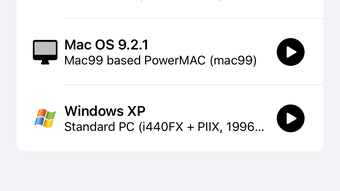
- Pre-Configured Machine Templates – Provides ready-to-use setups for popular retro systems, reducing setup time and improving usability for new users.
These features make UTM SE ideal for users aiming to run DOS games, early Windows versions, or legacy Unix-like systems on mobile. For example, a user can emulate a classic Windows 95 environment to play original PC games or set up a Linux terminal for educational purposes. The emulator’s architecture support ensures compatibility with software from different computing eras, while the dual-mode display allows optimal viewing depending on the application’s interface. The developer did not specify performance details or resource usage.
User Interface, Workflow & Performance
The user interface of UTM SE: Retro PC emulator is designed for mobile use, featuring touch-friendly controls and a streamlined layout. Navigation is handled through a central dashboard that displays available virtual machines, with options to create, edit, or launch configurations. The workflow is generally intuitive, allowing users to select a machine and start emulation with minimal steps.
However, the developer did not specify resource usage details, so actual CPU and RAM behavior remains unknown. Performance observations are based on general software behavior patterns. Users may experience variable frame rates depending on the emulated system and device capabilities.
Some users have reported random crashes during gameplay, which could affect workflow continuity. The emulator does not include JIT support, which may result in slower execution for certain applications. Stability appears to vary across devices, though the developer did not provide information on crash frequency or resolution.
Overall, the workflow remains functional for basic emulation tasks, but users should expect occasional interruptions.
Compatibility & System Requirements
UTM SE: Retro PC emulator is available for both Android and iOS platforms, making it accessible to a wide range of mobile users. The current version is 1.0.1, with a file size of 45.6 MB, indicating a lightweight installation. The developer did not specify exact system requirements, including minimum hardware specifications or OS versions.
Compatibility information was partially provided, listing only the supported operating systems. Users are advised to ensure their device meets general mobile performance standards for running emulation software. No additional hardware or peripheral dependencies were mentioned.
The emulator does not require a constant internet connection, supporting offline usage. However, updates may be required to maintain compatibility with newer mobile OS versions.
Pros and Cons
Pros
- Free to use with no licensing restrictions
- Supports multiple architectures including x86, PPC, and RISC-V
- Offers both VGA and terminal display modes for flexible output
- Based on the reliable QEMU emulation engine
- Allows custom machine creation and pre-configured templates
- Lightweight installation at just 45.6 MB
Cons
- Lacks JIT compilation support, potentially impacting performance
- Random crashes reported by some users
- Missing detailed system requirements or resource usage data
- Performance may vary significantly across devices
- Interface may feel limited compared to desktop emulators
FAQ Section
Is UTM SE: Retro PC emulator free to download and use?
Yes, UTM SE: Retro PC emulator is available at no cost. There are no subscription fees or in-app purchases required for core functionality.
Which mobile platforms does it support?
The software is compatible with both Android and iOS devices, allowing users to run retro PC environments on smartphones and tablets.
Does it require an internet connection to function?
No, UTM SE: Retro PC emulator can operate entirely offline once installed. It does not rely on cloud services for emulation.
What types of operating systems can be emulated?
It supports various systems that run on x86, PPC, and RISC-V architectures, including DOS, early Windows versions, and some Unix-like environments.
How often are updates released?
Updates are released periodically to improve stability and add new features. The latest version is 1.0.1, released on May 15, 2024.
Final Thoughts + CTA
UTM SE: Retro PC emulator delivers a compelling solution for mobile users seeking to relive classic PC gaming and computing experiences. Built on the trusted QEMU framework, it supports multiple architectures and offers flexible display modes, making it a versatile tool for retro enthusiasts. While it lacks JIT support and has reported stability issues, its free availability, lightweight design, and broad compatibility make it a strong contender in the mobile emulation space.
The ability to configure machines from scratch or use pre-built templates enhances usability for both beginners and advanced users. However, the absence of detailed system requirements and performance data may limit informed decision-making for some. For those passionate about retro computing and mobile gaming, this tool offers a unique opportunity to carry vintage systems in their pocket.
Download UTM SE: Retro PC emulator now.







